Being a critical component of any data-driven organisation, a Data Warehouse is a necessity.
However, you’re probably wondering why your Data Warehouse is the biggest pain in your life, or maybe you don’t even have one yet?! Unfortunately, there isn’t one quick fix to solve all your problems – as nice as that’d be!
But it’s time to get real – most Data Warehouses are crap. And, ultimately, yours could be one of them.
A poorly designed or maintained Data Warehouse can cause serious problems for your business, becoming a hindrance rather than a help. Which we’re sure you don’t want, and we certainly don’t want that for you!
But why are you dealing with a crap Data Warehouse? It doesn’t have to be this way; you shouldn’t be suffering!
Keep scrolling (and reading, obviously) and you will learn why your Data Warehouse is failing and how to eliminate your Data Warehouse pain and experience Data Warehouse pleasure.
With a mass of legacy code built up over a significant amount of time, by an amalgamation of different developers, consultants, freelancers or even monkeys – your Data Warehouse has no coding standards. Each individual has their own way of working and different approaches to answering your technical problems, which causes points of concern.
Arguably, this doesn’t solve any of the technical problems you have encountered within your Data Warehouse. It just raises more problems!
With the different processes, different ways to answer problems and no coding standards, from these individuals, it makes the support process a massive pain. Resulting in your having to sift through the code, try to understand what is happening, why it is happening, how it is happening, where it is happening… you get the picture.
Consequently, it takes hours to try and figure out what caused the problem in the first place! And in that time, you’ve probably encountered even more issues which you need to spend even more time trying to fix. It’s a vicious cycle, to be honest!
As if this wasn’t enough, the support overhead for this is massive! Having to do these manual and repeatable tasks is time-consuming and a huge strain on your resources. Let’s face it, do you really enjoy doing these mundane tasks?
Repetitive tasks kill productivity.
The more time that is being spent on doing mundane, repeatable tasks the less time you spend on the things that matter and benefit your organisation’s growth and overall success.
Why are you doing repeatable tasks? You could spend your time wisely, and more efficiently, by building out new data features and data products that will help your business advance and contribute to the building of a data-driven culture. Oh wait, you don’t have the time because of these mundane, repeatable tasks!
Why waste time and money when you can automate these processes? Seems simple, right?
Data is clearly vital to your organisation, which is why you need to stop wasting time processing data and struggling to build new data processes. You need to start spending your time being laser-focused on delivering data-driven analytics.
This is where we can help you!
At Engaging Data, our experience with Data Automation tools has helped us build many different data platforms for our clients.
Working closely with you, we’re here for a good time not a long time! Taking your data and requirements and transforming them into usable assets in a matter of weeks – not months.
If you don’t experience this at the moment and your Data Warehouse is failing or if it is the biggest pain within your organisation, we have something for you!
Start experiencing Data Warehouse pleasure instead of Data Warehouse pain.
Get our FREE DOWNLOAD on the 10 Reasons Why Your Data Warehouse is Killing You and stop your Data Warehouse from failing!
In this download, there is even more insight and information into why your Data Warehouse is failing. Go on, download it!
Or you could just keep your struggling with your crap Data Warehouse – it’s up to you!
FREE DOWNLOAD: 10 Reasons Why Your Data Warehouse is Killing You!
By submitting your information, you’re giving us permission to email you. You can unsubscribe at any time. FYI: We won’t spam your inbox!
Our next Engaging Data Bites is happening! This time with our partner WhereScape! Join us on the 7th June at 12:30!
Don’t miss out, save your spot and get ready to feast on knowledge about WhereScape and their Data Automation Software.
About WhereScape –
WhereScape allows you to increase productivity, scale with standards, foster collaboration and continuity across your data community and own your data!
Organisations across the globe, of all sizes, rely on WhereScape Data Automation Software.
From Data Warehouse and Vaults to Data Lakes and Marts, WhereScape helps you deliver data infrastructure and big data integration fast.
Eliminate hand-coding, automate data and documentation and focus on the work that drives you towards business success!
Want to learn more about WhereScape? Click the button below!
How Data Automation Will Optimize Your Organisation
In today’s world it is arguably that the backbone of every organisation is Data.
From small startups to large corporations, data is everywhere and should be used effectively. For making informed business decisions, understanding customer behaviour, and improving overall efficiency – data is essential to drive further success.
Yet, manually collecting, analysing and interpreting data can be a time-consuming and error-prone process due to the flawed nature of the human intervention. This is where Data Automation can be hugely beneficial to you and your whole organisation.
Data Automation is the process of collecting, processing and presenting data using automated tools, instead of performing these tasks manually. Data Automation eliminates the reliance on manual labour with bots that do the job for you: more efficiently.
With almost no human intervention, the automated process of collecting, transforming, storing and analysing data using well-designed methods, software and Artificial Intelligence will optimize your organisation.
Data Automation can…
Save Time and Money:
With a plethora of automation tools on the market and being more accessible than ever before – why are you yet to adopt the technology that saves you time and money.
Data Automation is designed with what people want in mind, making their lives simpler, eliminating the need to do manual, mundane tasks, and instead focusing on tasks where their skillsets are utilised effectively and proactively.
It is easy to locate opportunities and areas for Data Automation on your own – once you know what to look for. A task that can allow for data automation usually involve:
A lot of data entry
Repeatable and repetitious actions
Any margin for error
Stop doing tasks manually and automate them. Optimize your team’s time with more meaningful work and reduce costs across your organisation.
Create Accurate and Fast Data:
The value of data comes from its quality. With mundane, time-consuming, and costly manual tasks completed by teams, it creates these processes to be slower and less accurate.
With the adoption and implementation of Data Automation within your organisation, mundane tasks will become obsolete and replaced with automated processes.
Data Automation can help analyse data faster and more effectively. With the ability to do a variety of tasks, Data Automation is especially helpful and can be used for data discovery, data preparation and data warehouse maintenance.
Not only does Data Automation allow for your team to focus on more meaningful tasks which use their skillsets more effectively, but it bridges the gap and makes your data faster and more accurate – garnering more business success.
Pairing Data Automation with Data Streaming and Data Quality tools will make your data faster and even more accurate, also allowing for:
Durability
Reliability
Scalability
ETL Capabilities
Create Better Documentation:
Raise your hand if you enjoy data documentation? Let’s be real; documentation isn’t the most exciting part of working with data. However, its importance cannot be understated.
The data documentation process can be difficult and not the most enjoyable. However, automating data documentation is an obvious solution to the problem that you face when working with data.
Removing manual work of maintaining the documentation and creates a consistent process, overall ensuring reliable and trustworthy data and insights across your organisation.
Documentation is one of those things you’d thank your past self for doing, it is always a great resource to look back on.
Understandably, you’re probably too busy to document everything like decisions, statuses and steps for handling repetitive tasks. So, why don’t you automate it!
Automating your documentation process will:
With a single source of truth, save time and energy
Improve quality and process control
Cuts down duplicative work
Makes hiring and onboarding simpler
Make everyone in your organisation market with a single source of truth.
Teams who are yet to start automating their data documentation are missing out on serious time, capacity and data literacy opportunities.
Make all your Data in One Central Repository:
Imagine having one single place where you would have one single source of information. Sounds like a dream, right?
Well, make that dream a reality with the implementation of a central Data Repository.
A central data repository is a collection of stored data from existing databases merged into one so that it may be shared, analysed or updated throughout your entire organisation. It is essentially created by integrating the data from all available sources.
Having all your data in a central repository allows for your data to be easily organised, analysed and secured. As well as this, it can help your business fast-track decision-making by offering a consolidated place to store data critical to your business operations.
With ETL Data Automation tools, you can Extract, Transform and Load data seamlessly and efficiently into a central data repository, whether that is a Data Warehouse or a Data Lake, for example.
Make your Data Storage System Scalable:
The need for a secure, reliable and efficient data storage solution has increased. Yet, businesses struggle with data storage as a result of the proper infrastructure to handle growing data.
With the fluctuation and expansion of business, a scalable data storage system is a necessity to cope with needs and the quickly changing nature of business.
Using Data Automation software, it is ready to scale as your business expands, as well as balancing your team’s workloads, highlighting bottlenecks and reducing resource consumption.
Scalable data storage solutions are flexible, easy to manage and can handle exponential growth – far superior to outdated, traditional solutions with limited functionality.
The data storage solution you choose should be reliable and efficient to allow your business to thrive.
It can be difficult to choose with a plethora of storage solutions on the market, yet working with us, the Experts behind Data Automation, we will make the solution simple and adhere to your specific requirements.
Modernise your Legacy Data Warehouse:
Organisations in today’s modern business world are being bombarded with data from various sources. Data which you need to collect, analyse, store and ultimately use in order to drive business decisions.
Legacy Data Warehouses weren’t built with today’s digital capabilities and requirements.
They are slow, rigid and generally expensive, with upfront and ongoing maintenance costs. This results in a more limited set of analytical capabilities, and it is slower to uncover business insights – making the decision-making process significantly slower.
Modernising your Legacy Data Warehouse is a necessity for your organisation. Despite it not being the easiest process, you will benefit hugely from the modernisation of your Data Warehouse.
Here some benefits of Modernising your Data Warehouse and working with the Experts behind Data Automation, to achieve this modernisation:
Cost Reduction
Improved Profitability
Sales Projections
Standardized Processes
Improved Efficiencies
With data growing significantly, your business will need an infrastructure that can manage and store this data to provide you with valuable insights and stay ahead within the competitive marketplace.
Modern Data Warehouses are more flexible, intuitive, and efficient when it comes to storing and managing data.
Increase Productivty within Your Organisation:
In search of optimisation and efficiency within business, Data Automation is the way forwards, and your company should embrace it.
Data Automation has always been propelled by the desire to get more done, reduce costs and limit human error, simultaneously.
Create a higher level of efficiency with Data Automation.
Eliminate Data Silos:
When it comes to decision-making, intuition is fine, but data is even better – you should rely on it.
However, Data silos are a pain point for a lot of companies. Being a big blocker for decision-making, Data silos often get in the way of your business success.
A data silo is a repository of data that’s controlled by one department or business unit and isolated from the rest of an organization. Often common in bigger companies, data silos can arise in any sized company and cause huge issues:
Give an incomplete view of your business
Create a less collaborative environment
Lead to poor customer experience
Slow the pace of your company’s growth and development
Create security risks
Threaten the quality and accuracy of your data
With the implementation of Data Automation, Data silos will become obsolete, breaking down Data Silos and connecting data assets by:
Data integration
Data Storage
Enterprise Data Management & Governance
Culture Change surrounding data
With all these benefits it is simple to say that implementing Data Automation within your organisation is a no brainer! It is a powerful tool to have in your organisation’s toolbelt.
It can optimize your organisation by streamlining data collection, improving accuracy, enhancing data analysis, increasing productivity and improving decision-making.
By automating your data processes, you can save time, reduce errors and make better use of resources.
At Engaging Data, we understand that you need data built efficiently to gain value quickly.
Using innovative Data Automation tools, we will help you seamlessly integrate your data into accessible and secure platforms.
Building Data for a purpose, we only process your relevant information to achieve your goals.
Do more with less effort.
If you haven’t already implemented Data Automation in your organisation, now is the time to consider doing so.
Implement Data Automation within your organisation and work with The Experts behind Data Automation.
Start your Data Automation transformation.
Get in touch or fill out the form below to discuss how Data Automation will optimize your organisation:
Data Science is a relatively new, evolving and exciting data function. As this article explains, different organisations have various ways of organisation their data science teams, along with it’s managing them.
Organisations increasingly see data as a valuable asset that will help them succeed, now and in the future.
The value of data has been increasing in recent years, and it shows no sign of slowing down.
The first barrier to effective data and analytics is still the lack of qualified talent. Other familiar challenges include limited access to siloed data, lack of processing power and the absence of a data strategy to help turn data into actional information, which we have discussed previously here. More and more organisations are creating data science functions to lead their efforts in data mining, predictive modelling, machine learning and Artificial Intelligence (AI).
We have created this guide to provide best practices for creating and managing a Data Science team.
We have included the different ways a team can be set up, the positions it is likely to form and the executives to whom a team may report.
Models for Structuring a Data Science Team:
Data collection, management and analysis are typically the responsibility of the Chief Information Officer (CIO). The IT team works with business users to implement data warehouses and business intelligence (BI) systems that hold and organise data, enabling fundamental analysis and reporting.
However, over the past two decades, more organisations have separated the data function into their department as internal data stores grew, supporting technologies evolved, and data-related tasks became more differentiated and specialised.
The increasing importance of analytics to business success also drove the need for a data science team with skilled Data Scientists and Engineers. Today, many organisations, anything from a team or an entire data science department, provide this service. Larger organisations may have multiple teams that operate independently or in a coordinated way.
These teams are tasked with collecting and cleaning data from various sources, identifying patterns and insights, and presenting their findings to executives with actionable recommendations. Often this involved working with internal teams, external partners and vendors specialising in certain analysis types.
Data Scientists may work in areas like Sales and Marketing, Finance and Accounting, Product Development, Human Resources, Customer Service, Operation Management, Risk Management, Legal Affairs, Compliance/Governance, etc.
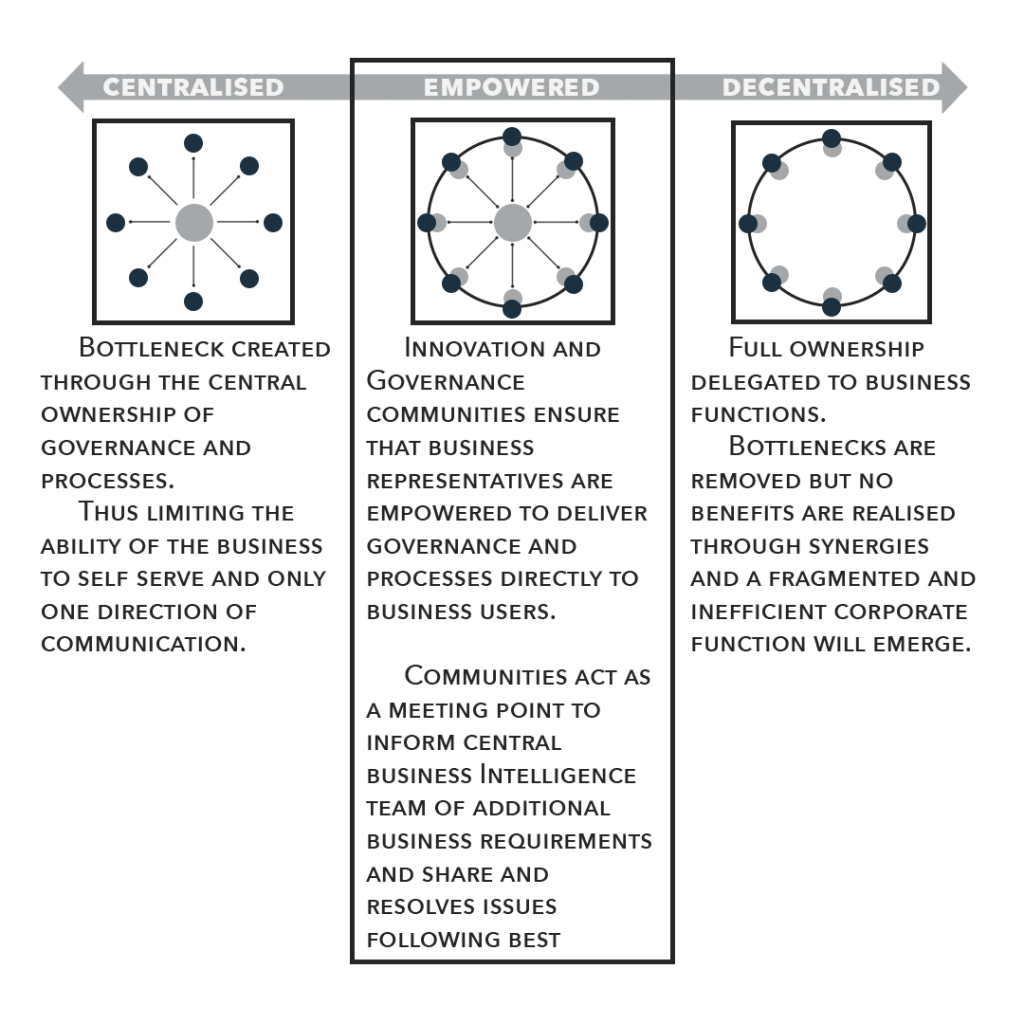
How a company structures its teams vary based on its Data Science program’s maturity, data analytics goals, overall organisational structure and enterprise culture. However, some common Data Science team structure models have emerged, each with pros and cons.
Team structure can be:
A Decentralised Team:
Where members work within the individual business units they support. This allows team members to collaborate closely with businesses on data science projects.
This approach can under the strategic use of data across an organisation and require more resources than smaller companies may have available.
A Centralised Team:
That consolidates a data science function into the enterprise, which manages individual projects and oversees resourcing. This approach allows for an enterprise-wide strategic view and uniform implementation of analytics best practices more efficiently.
However, it can limit the ability of team members to become experts in a particular area of the business. Some organisations establish a formal data science centre as a centralised team.
A Hybrid Team:
This approach creates a data science team who centrally manage all project with specific business operations. This team is accountable for helping those units reach their objectives and make data-driven decisions.
In hybrid structures, a centre of excellence may also focus on promoting best practices and standards for data science. As with the decentralised model, resource constraints can be an issue.
Data Science Team – Roles and Responsibilities:
Successful data science teams share common structures, roles and responsibilities regardless of the size or scale.
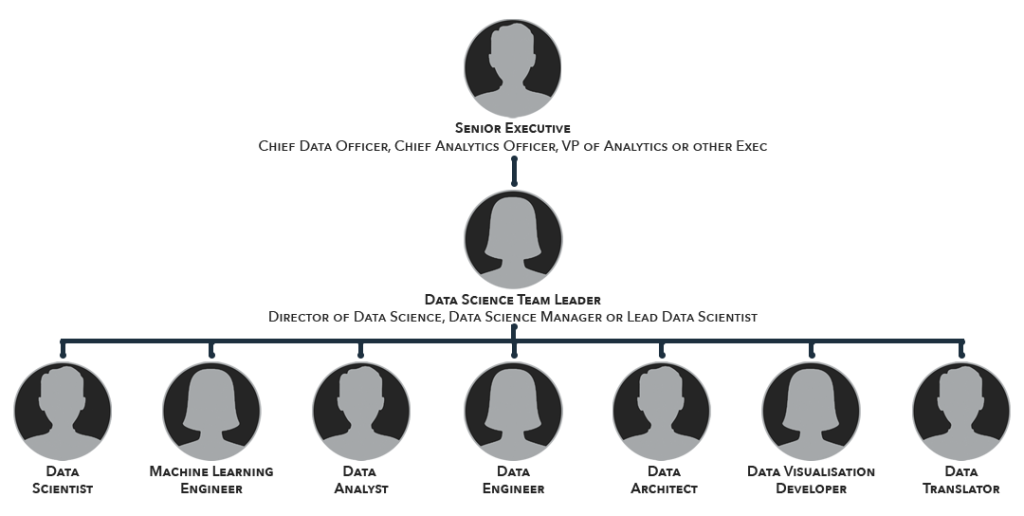
Small organisations with limited analytics needs or early-stage data science initiatives may have a generalist handle all the required tasks. Larger entities and those with more mature programs typically include some combination of the following roles in their data science teams:
Data Scientists –
Data Scientists are key team members, using statistical methods and machine learning algorithms to analyse data and create predictive models. They also build data products, recommendation engines and other technologies for various use cases.
Data Scientists typically have multiple skills in mathematics, statistics, data wrangling, data mining, coding and predictive modelling. Expect people in this role to have advanced data science degrees or graduate-level data science certifications.
Data Analyst –
Data Analysts are responsible for collecting and maintaining data from operational systems and databases. they use statistical methods and analytic tools to interpret the data and prepare dashboards and reports for business users. Data Analysts do not have the complete skillset of a Data Science, but they can support data science efforts.
Data Engineer –
This role is responsible for building, testing and maintaining the data pipelines that power a business. A Data Engineer uses software engineering and computer science skills to focus on the technology infrastructure, data collection, management and storage. Data Engineers work closely with Data Scientists on data quality, preparation, model deployment and maintenance tasks.
Data Architect –
Data Architects are responsible for designing and overseeing the system design and infrastructure implementation. A Data Engineer can also assume this role.
Machine Learning Engineer –
Sometimes, this role is referred to as an AI Engineer: Machine Learning Engineers are responsible for creating, deploying and maintaining the algorithms and models needed for machine learning and AI initiatives.
In some organisations, Data Science teams may also include these positions:
Citizen Data Scientist –
An informal role can involve business analysts, business-unit power users and other employees capable of doing their own data analytics work. Citizen Data Scientists are often interested in understanding or training in advanced analytics. However, their technologies – for example, automation machine learning tools – typically require little to no coding. They often work outside a data science team but may be incorporated into ones embedded in business units.
Business Analyst –
Business Analysts are key in supporting the work of data scientists. Data Scientists are responsible for tethering, cleaning and organisation data, as well as creating new or altering models that predict what will happen in the future,
In addition, Business Analysts may be attached to Data Science teams, which includes evaluating business processes and translating business requirements into analysis plans, areas in which they can help support the work of data scientists.
Data Translator –
The term ‘analytics translator’ is relatively new in the corporate world, but it refers to a very important role growing in popularity. The Analytics Translator acts as a liaison between Data Science teams and Business Operations, helping create and plan projects and translate the insights from data analytics into recommended business actions. This role often falls to the Business Analyst.
Data Visualisation Developer or Engineer –
They’re tasked with creating data visualisations to make information more accessible and understandable for business professionals. However, Data Scientists and Analysts may handle this role in some teams.
Regardless of sector or industry, Data Science teams need to be strong in three core areas: Mathematical, Technology and Business Acumen,. It is rare to find a single person that excels in all three. Often companies will have someone fluent in two of the three, and then the rest of the team is built around that, filling in the caps to ensure the team is strong in all three.
Simon Meacher, Managing Director, EngagingData
Management and Oversight –
A Data Science team will be managed and overseen by either a lead Data Scientist, Data Science Manager, Director of Data Science or a similar managerial position
The reporting structure for teams similarly varies. Generally, organisations assign a C-Level executive or high-ranking functional manager to oversee the Data Science team.
A Chief Data Officer (CDO) often oversees the Data Science function.
In 2002, Captial One created the first CDO position within the Financial Services industry. Since then, the CDO role has grown in popularity.
This role initially focused on Data Governance, Management and Security functions. More recently, CDOs have also taken on responsibility for Data Science, Analytics and AI.
Other organisations have created a Chief Analytics Officer (CAO) role to oversee their Data Science and Analytic teams.
Hybrid roles exist, combining the CDO and CAO responsibilities into a Chief Data and Analytics Officer role.
The head of a Data Science team may be subject to matrix reporting, allowing the role to report to a different Executive; for example, the COO, CFO or CIO or a position such as Director of Analytics, Business Intelligence Director, Head of Business Data or Director of Data and Strategy.
How Data Scientists Work with Business Users –
Organisations within all industries are recognising the need to become data-driven and see it as a key to remaining competitive and set up the Data Science team to collaborate with business teams to:
– Understand the business problem or questions that the team want to answer
– Set and articulate the objectives for using the data.
– Plan how to apply the knowledge to make decisions and take action.
Once they understand Data Science teams cannot merely present their findings. They work with the business teams to understand the insights gained from the data and how that information can shape product and service offerings, marketing campaigns, supply chain management and other critical parts of business processes and operations to support company goals., such as: higher revenue, increased efficiency and better customer service.
In my experience, Data Science teams need to work closely with the business. Without using the wealth of knowledge about the data from the business, the Data Scientists will struggle to provide value from the data.
Carl Richards, Head of Consulting, EngagingData
Tools that a Data Science Team Needs –
Dozens of tools, ranging from data visualisation and reporting software to advanced analytics, machine learning and AI technologies, enable Data Science teams’ work. The number and combinations of technologies needed can be unique to each team based on its goals and skill levels.
The following is a list of commonly used Data science tools that include bothering commercial and open-source technologies:
– Statistical Analysis Tools: SAS and IBM SPSS
– Machine Learning frameworks and libraries: TensorFlow, Weka, Scikit-Learn, Keras and PyTorch
– Data Science platforms from various vendors that provide diverse sets of capabilities for analytics, automated machine learning and workflow management and collaboration programming languages: Python, R, Julia, SQL, Scala and Java
– Jupyter Notebook and other interactive notebook applications for sharing documents that contain code, equations, comments and related information
– Data Visualisation tools: Tableau, QlikView, Power Bi, D3.JS, Matplotlib
– Analytics Engines and Big Data Platforms: AWS, Azure, Google BigQuery, Hadoop, Snowflake, Spark
– Cloud Object Storage Services and NoSQL Databases
– The Kubernetes container orchestration service for deploying analytics and machine learning workloads in the cloud.
Best Practices for Managing a Data Science Team –
Executives and team leaders needing to build and mature their Data Science programs should consider the following best practices for managing their teams.
Seek out workers with a range of business, interpersonal, and technical skills to help ensure that the team can meet organisational objectives.
Create a culture of learning and innovation that challenges team members and encourages them to bring new thinking to business problems and issues.
Promote analytics projects that encourage close collaboration between the Data Science team and the business units they support.
Evaluate team members at least partly on the business successes and work drives. Create a mentorship program to help advance the skills of junior team members, and do ongoing training to ensure that all workers stay current on key data techniques and technologies.
Talent retention programmes will help keep Data Scientists, who are in high demand and experienced, with plenty of job opportunities.
Overall, the world is changing, and Data Science is one of the most powerful tools for that change.
Data Science is more than just crunching numbers; creating a greater data science function within your company will benefit your organisation and future-proof its ability to change with its strategic objectives.
By embracing Data Science as an integral part of your business, you can ensure that your organisation is agile enough to keep up with technological changes and consumer behaviour.
Do you need help creating or managing your Data Science Team? Do you want to create a data-driven culture within your organisation? Or do you need to use Data Science Professionals?
We are delighted to announce that we have partnered with BiG EVAL.
To celebrate, we are hosting Engaging Data Bites – a 30-minute Lunch and Learn where you can feast on knowledge.
About BiG Eval –
BiG EVAL maximizes everyone’s trust in your data through intelligent, continuous validation ensuring data quality, while also speeding up the development of data-centric projects and DataOps process automation.
Integrate test cases into your continuous delivery process to verify system components, or even into your data integration process for automated data validation.
The BiG EVAL data validation resource centre includes predefined test templates and examples to accelerate your data quality journey with BiG EVAL, aiming to get you up and running in days, not months.
Want to learn more about BiG EVAL? Click the button below!
To celebrate this partnership, we are hosting Engaging Data Bites – our 30-minute virtual Lunch and Learn where you can feast on knowledge about all things BiG Eval!
To provide the best experiences, we use technologies like cookies to store and/or access device information. Consenting to these technologies will allow us to process data such as browsing behaviour or unique IDs on this site. Not consenting or withdrawing consent, may adversely affect certain features and functions.
Functional
Always active
The technical storage or access is strictly necessary for the legitimate purpose of enabling the use of a specific service explicitly requested by the subscriber or user, or for the sole purpose of carrying out the transmission of a communication over an electronic communications network.
Preferences
The technical storage or access is necessary for the legitimate purpose of storing preferences that are not requested by the subscriber or user.
Statistics
The technical storage or access that is used exclusively for statistical purposes.The technical storage or access that is used exclusively for anonymous statistical purposes. Without a subpoena, voluntary compliance on the part of your Internet Service Provider, or additional records from a third party, information stored or retrieved for this purpose alone cannot usually be used to identify you.
Marketing
The technical storage or access is required to create user profiles to send advertising, or to track the user on a website or across several websites for similar marketing purposes.